


Troubleshooting
IMER Pump Rotor and Stator Wear: Signs, Checks, Parts
Falling material flow or a BLOC message on an IMER Step-Up 120, Small 50 or Koine 4? What the manuals say to check, how to swap the pump, and the parts listed.
IMER Parts USA teamParts specialists
Published 4 min read
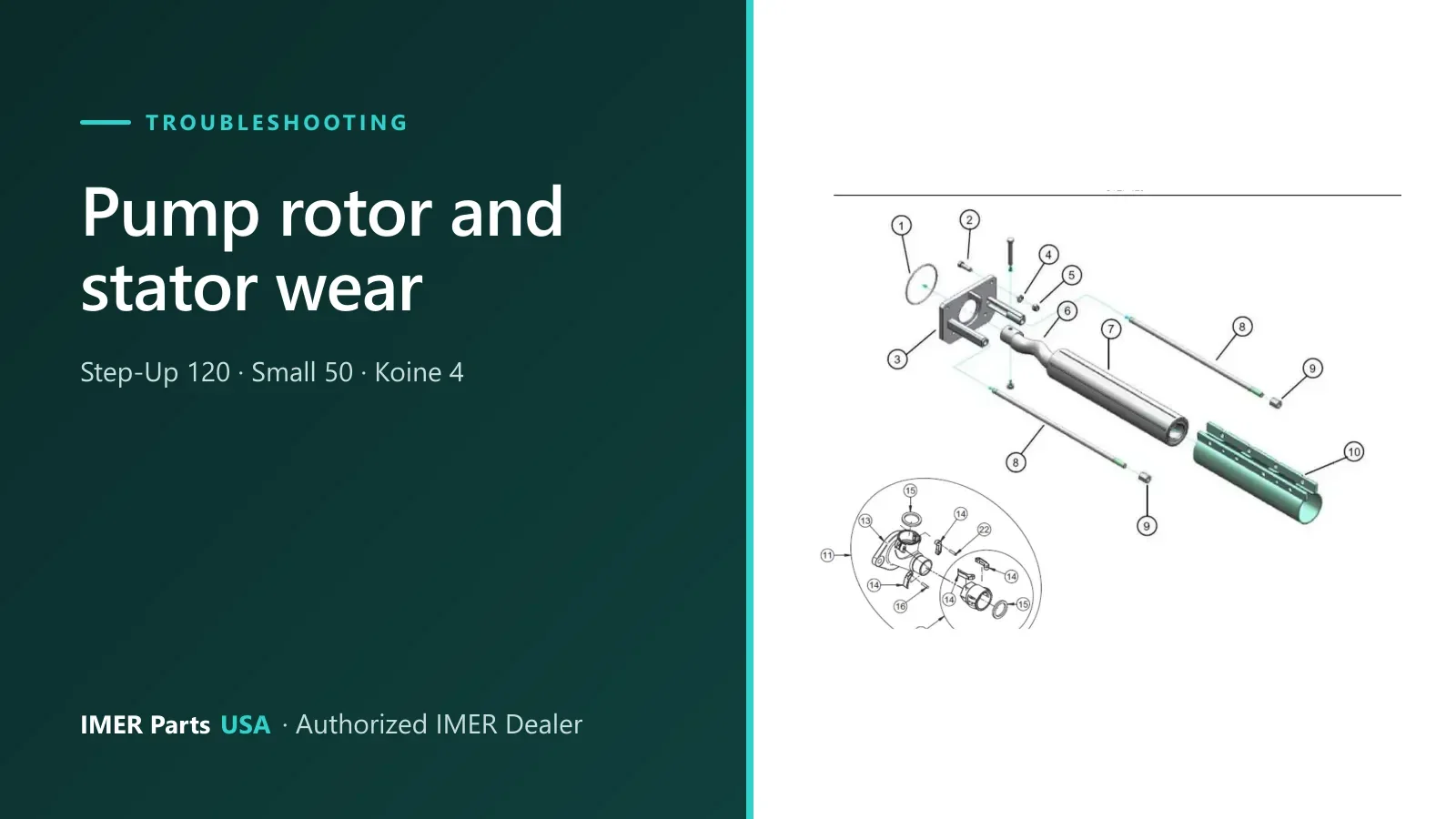
The IMER Step-Up 120, Small 50 and Koine 4 all push material with a screw (progressive cavity) pump: a rotor, which the manuals call the screw, turning inside a rubber stator. Over time the pair wears, and the pump delivers less.
This guide pulls together what the three manuals say about wear signs, what to rule out first, how the pump comes out, and which parts the parts books list.
Signs of a worn pump
| Machine | What the manual says | Manual page |
|---|---|---|
| Step-Up 120 | A reduction in material flow to the jet may indicate a worn pump. | PDF p.35 |
| Small 50 | A reduction in material flow to the jet may indicate a worn pump. | PDF p.24 |
| Koine 4 | If the material delivered is alternately hard and soft, this may indicate a worn pump. | PDF p.24 |
Note the words “may indicate”. A weak or uneven flow has other causes too, so rule those out first.
Check these before you blame the pump
A clogged line looks different. After a prolonged shutdown, the manuals describe clogging: no material comes out of the jet and the pressure gauge reads higher than the normal working value. That points to a blocked hose, not a worn pump. The fix is to reverse the pump to depressurise the line, locate the clog and clear it.
Material and set-up. For a Step-Up 120 that stops, trips an error or loses flow, the manual’s tables list these causes and fixes:
- The mix has low binding properties or is too dry. Empty the hopper and make sure the screw is not blocked, then restart with a wetter, richer mix.
- A clogged material hose or spray jet, too little binder in the mix, sand that is not suitable, or oversized bodies in the mix.
- Too long a pipeline (error ERR03) or an overloaded pump motor (ERR04). Check the mixture, shorten the pipeline, or reduce the pump speed.
The BLOC message. On the Small 50 and the Step-Up 120, BLOC means the screw pump motor is jammed. The manual’s remedy is to check whether the stator and rotor are jammed together.
What shortens pump life
- Running with no material. The Step-Up 120 and Small 50 manuals say the machine must never be started or left running with no material in the hopper, to avoid premature wear of the stator and screw.
- The wrong lubricant. When you fit the screw into the stator, use the lubricant spray available from IMER. Never use mineral oil or grease, because they may damage the stator. Avoid all types of benzene.
- A power failure mid-job. Wash the machine and the pipes promptly, take the pump apart, remove the screw from the stator and clean both.
Replacing the pump on a Step-Up 120
The Step-Up 120 manual (3226875 R16) describes the swap this way. Always use your own machine’s manual as the final word.
- With the machine empty and clean, remove the vibrating screen or hopper grid.
- Tilt the machine with the manifold upwards.
- Unscrew the tie-rod locking screws and, at the same time, remove the delivery manifold, the screw and the stator.
- Lubricate with IMER lubricant spray when you insert the screw into the new stator. No mineral oil, no grease.
- Refit the pump, taking care to insert the mixer in its seats.
The Small 50 and Koine 4 differ in the removal steps:
- Small 50: remove the hopper grid, tilt the machine with the manifold upwards, remove the wedges with the aid of a mallet, and at the same time take off the delivery manifold, screw and stator.
- Koine 4: release the handle on the left and open the mixing chamber. Insert the tube wrench on the end of the mixer and unscrew until the screw inside the stator is released. Close the chamber, tilt and lock it in the lifted position, remove the material delivery manifold and fit a new screw-stator unit.
The manuals also say to use original IMER spare parts only, and that modifying parts is prohibited.
Which rotor and stator does your machine use?
Do not order from the machine name alone.
Step-Up 120. IMER’s product sheet says you can choose a 2L6, IM25L, 60.12 or L7 rotor and stator. The parts book lists the 2L6 set in pump kit drawing 16: stator 1107077 (ref 7) and rotor 1107078 (ref 6). The drawing is titled Pump Kit 2L6 (1107088). The book also lists an IM25L set, stator 1107110 and rotor 1107111, in pump group drawing 3. Check which set is fitted to your machine.
Small 50. The parts book lists the ECO D.8-1.5 stator 1107030 (ref 9-A) and rotor 1107031 (ref 11-A), and a separate “Small Old Castle” D4-1/2 set, 1107032 and 1107033.
Koine 4. Mixing chamber drawing 2 lists a D.8-1.5 DX ECO stator and rotor (1107030 and 1107031) and a D.6-3 DX set (1107020 and 1107021). Each has a serial-number note, and those ranges overlap, so do not guess.
Send the model and serial number through the fit check and a parts specialist will compare your machine with the IMER parts book.
Parts for this job
TaggedBLOCKoine 4progressive cavity pumprotorSmall 50statorStep-Up 120
5 parts
Parts in this guide
Machines in this guide
Keep reading
Related guides
Maintenance
IMER Mixer and Pump Cleaning, Storage and Winter Care
End-of-shift cleaning, freeze draining and storage steps from the IMER manuals for the Mix 750, Mix 120 Plus, Step-Up 120, Small 50, Koine 4 and more.
5 min read
Buying guide · Buying guides
How to Find the Right IMER Part Number for Your Machine
Find the correct IMER part number: what to read off the identification plate, how parts book drawings and reference numbers work, and what to send us.
4 min read
Authorized IMER Dealer
Not sure which part you need?
Send the machine model and serial number and a parts specialist gets back to you.